Always visible
A quiet signal in your menu bar.
The current pace is there when you need it, without opening a dashboard or interrupting the work.

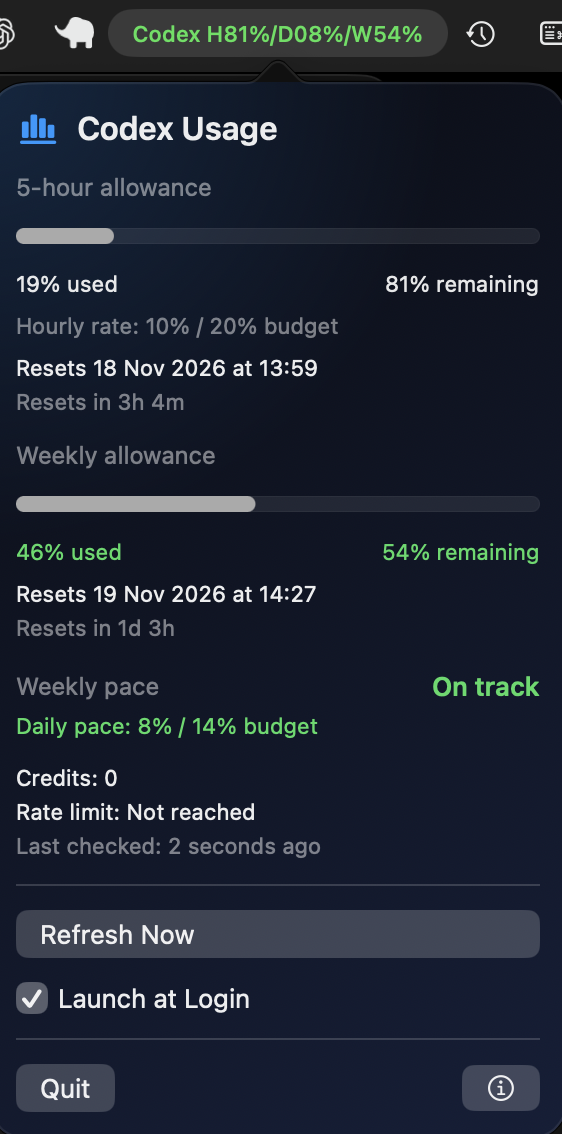
UsagePip puts your Codex usage pace in the menu bar, turning three easy-to-miss numbers into one calm signal.
The useful bit
Codex allowances are easier to manage when you can see the pace, not just the total. UsagePip keeps the readout lightweight: hourly, daily and weekly context, available before the next request.
Always visible
The current pace is there when you need it, without opening a dashboard or interrupting the work.
Three horizons
Hourly and daily pace sit beside the weekly allowance, so a busy hour has the context it needs.
Clear states
Green means on track. Amber means you are nearing the sustainable limit. Red means you are over pace.
Three horizons
H, D and W answer different questions. The five-hour window shows what is happening now. Daily pace shows whether today is getting ahead of itself. Weekly allowance keeps the bigger picture in view.
Native by design
UsagePip is a focused macOS utility: fast to launch, light to keep open, and at home in the menu bar. Automatic refresh and Launch at Login keep the signal available without adding another place to manage.